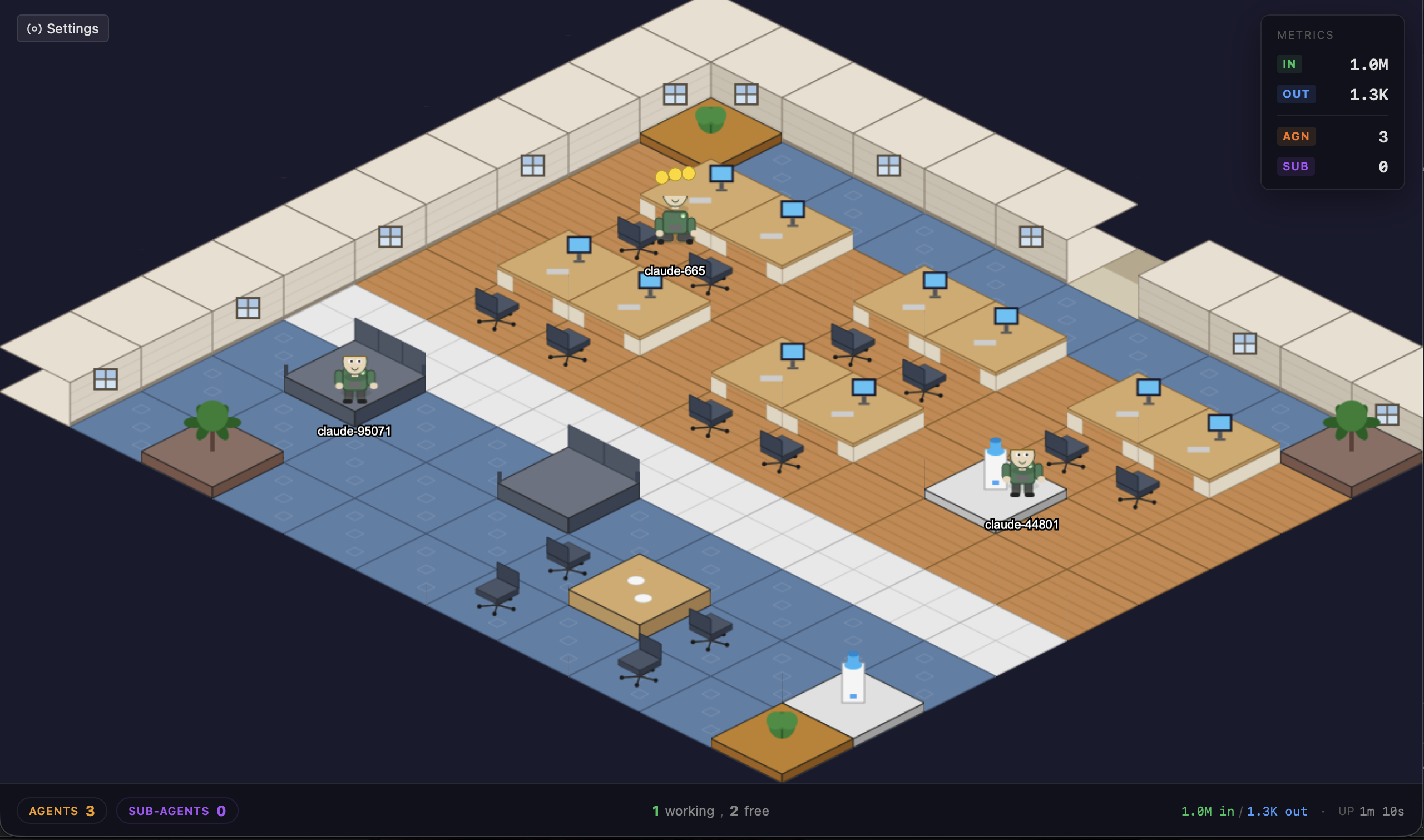
OfficeAI is a desktop application that turns running AI agents into employees of an isometric office. One glance shows who is working, who is thinking, and who just stepped into the kitchen for coffee. It is a pet project, built for fun: an experiment in visualizing the work of several AI agents at once, with no commercial ambitions and no plans to turn it into a product.
The Problem: More Agents, Less Control
In 2025–2026, a developer typically runs several AI agents in parallel: Claude Code in the terminal, Cursor IDE for refactoring, ChatGPT in the browser for documentation, Codex CLI for the backend. Each agent lives in its own window with its own status indicator — there is no shared picture across them. It is hard to tell at a glance who is working right now, who is waiting for confirmation, and who has been stuck for the past hour.
Switching between windows turns into a separate background load. The cognitive cost of jumping across terminals, IDE panels, and browser tabs scales linearly with the number of active agents, while the value of each switch decreases — most of the time the agent is in the same state as before.
The Concept: An Office Instead of Tabs
OfficeAI replaces scattered windows with a single visual space. Every running agent appears in the isometric office as an employee with their own workstation. An agent that is writing code shows activity indicators highlighting the type of task. An idle agent leaves the desk and walks to the water cooler, the kitchen, a meeting room, or the lounge area.
The state of every process can be read in a second, without switching windows. The game-like metaphor solves a practical monitoring problem and at the same time turns multi-agent work into a clear, observable scene — closer to a strategy game than to a system tray of background processes.
Features
- Real-time states. Color indicators show what the agent is doing: thinking, writing code, using tools, responding, or idling.
- Idle Zone Roaming. Free agents wander around the office without getting mixed up with active ones.
- Speech bubbles. Hovering over an agent opens a preview of the current response or task.
- Agents Panel. A summary table with model, status, project, and session duration.
- Chrome extension. ChatGPT, Gemini, and Claude.ai sessions running in the browser appear as separate office employees.
- Zero Intrusion. No plugins, wrappers, or CLI modifications — the application passively observes OS processes and reads log files.
Supported Agents
- CLI: Claude Code, Gemini CLI, Codex CLI
- IDE: Cursor IDE, Windsurf IDE
- Browser: ChatGPT, Gemini, Claude.ai (via the Chrome extension)
Technical Details
The Zero Intrusion principle is implemented by scanning operating system processes and tapping into the log files that agents already write by default. Agent behavior is unchanged, and no configuration is required. Resource usage stays within reasonable bounds: up to 5% CPU and less than 150 MB of RAM with 20 agents running simultaneously.
Supported platforms: macOS 10.15+ (universal .dmg, 13 MB) and Linux Ubuntu 22.04+ / Fedora 38+ with WebKitGTK 4.1 (.deb and .rpm, 5.2 MB). A Windows build (10 1803+, WebView2) is in development.
A Hobby Project, Open by Default
OfficeAI is developed as an open hobby lab. The code, ideas, and visualization experiments are open to forks and discussion, but the roadmap stays free of commitments to users. The point is not to ship a stable product on a schedule — the point is to explore what happens when multi-agent work is rendered as a place rather than a list of windows.
Links
Source code, roadmap, and issue tracker — on GitHub. Builds for macOS and Linux, the Chrome extension, and a detailed feature description are available on the project page.